 QR Anything by Avex
PDF to QR · Android guide
Your PDF.
One shareable QR.
Turn a menu, handout or schedule into an editable PDF QR in the QR Anything Android app. The PDF is hosted online; the code opens its viewer.
Publishing requires a verified account and internet access. People viewing the hosted PDF also need internet. A QR stores the hosted link, not the PDF file itself.
How to make a PDF QR code
- Prepare your PDF. Check that it is readable on a phone and contains only content you have permission to share.
- Open Create QR in the Android app. Choose PDF under Editable QR codes. Sign in and verify your account when prompted.
- Select the PDF. Add a recognizable title, review the sharing terms and publish. Follow the file-size limit shown in the app.
- Save and test the QR. Export it, open its link on another device and check that the correct PDF loads before printing.
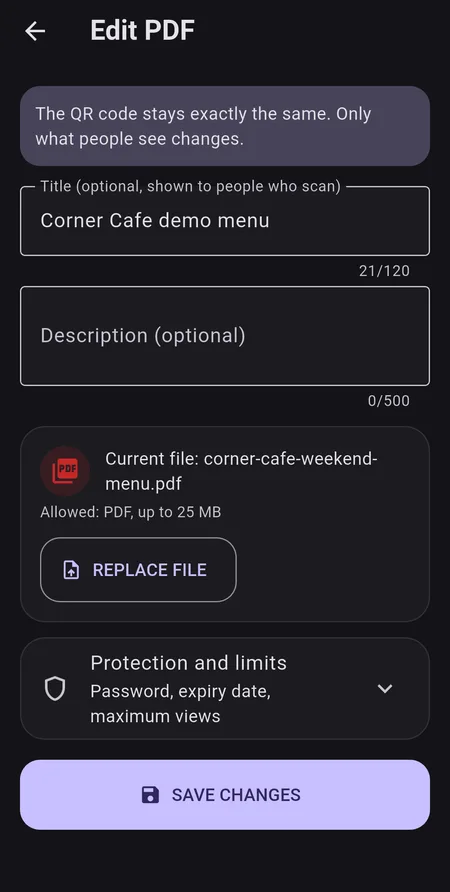
Replace the file without replacing the code
Open the original editable item in My QR. Choose Edit Content → Replace File, select the new PDF and tap Save Changes. Scan the original printed QR again. Creating a new QR instead produces a different link.
We tested a fictional weekday menu and replaced it with a weekend menu on a Play-installed Android build. The original QR link served the new PDF. Follow that complete menu walkthrough.
What happens after sharing?
The hosted viewer depends on the code remaining available and enabled. Deleting or disabling the editable item, or reaching an access limit you set, can prevent future views. A PDF already downloaded by a guest is a separate copy and does not update automatically.
PDF QR questions
Can I make a PDF QR on this website?
This website makes static URL, Wi-Fi and vCard codes. Uploading and managing hosted PDF codes happens in the Android app.
Can I use a PDF already hosted elsewhere?
You can encode its public URL using the static URL tool. That code keeps the same URL permanently. The destination file and permissions remain the responsibility of its hosting service.
Can guests read the PDF offline?
Opening the hosted QR page needs internet. Guests can separately save a downloaded copy for offline reading if their browser supports it.